

Logo Caen

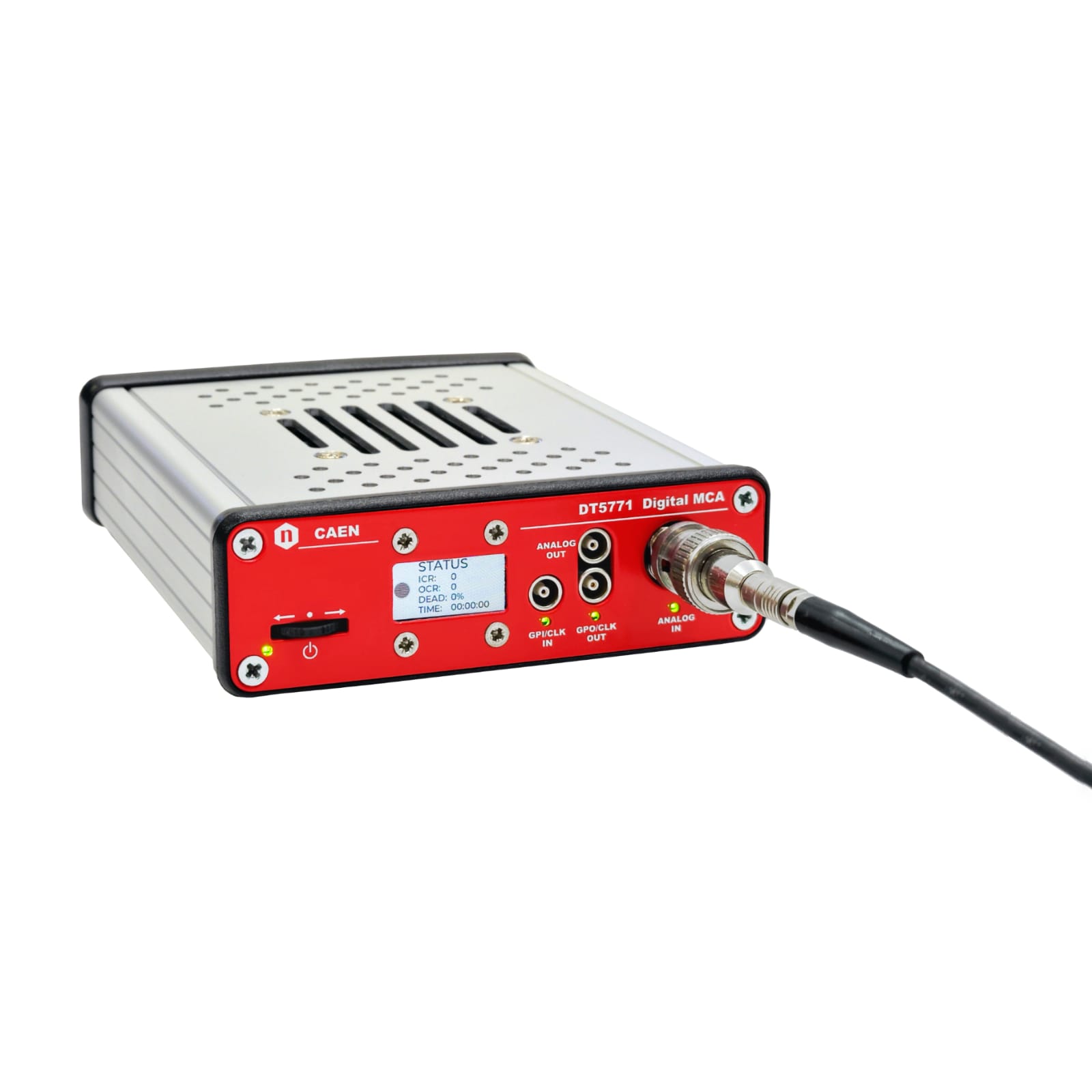
DT5771

New

1 Channel Digital MCA

Features

  • Compact 64k Digital MCA
  • Suited for high resolution Gamma Spectroscopy
  • Variable gain matching dynamic ranges 40 mVpp ÷ 5 Vpp
  • 1 kΩ / 50 Ω input termination
  • AC and DC coupling
  • USB 2.0, 1 Gbit Ethernet
  • Web-based GUI
  • DB9 connector for preamplifier power supply
  • User-friendly web interface for control and visualization
  • Back compatible library with DT5770 (COMING SOON)
3 Years Warranty
placeholder
3 Years Warranty
placeholder
placeholder
placeholder

Overview

The DT5771 is a 64k Digital Multi-Channel Analyzer (MCA) designed for gamma spectroscopy applications, offering a 14-bit 200 Msps ADC, Ethernet and USB2 connectivity, and an intuitive web-based interface in a compact desktop form factor. It supports a wide range of detectors, including HPGe, silicon, and scintillation detectors (NaI, LaBr3), with variable gain, selectable 1 kΩ/50 Ω input termination, and AC/DC coupling for maximum compatibility.

The DT5771 supports multiple real-time acquisition modes:

  • MCA with trapezoidal filtering for energy spectrum analysis
  • Peak Detector Mode for timing and amplitude analysis

The web-based GUI provides intuitive control and real-time spectral analysis without additional software.

The module includes USB 2.0 and 1 Gbit Ethernet, GPIO for external triggers, and Clock/Sync I/O for multi-board synchronization. Status LEDs offer quick system diagnostics.

The DT5771 offers a user-friendly Web interface with Jupyter Lab for Python-based scripting

Seamlessly replacing the DT5770, the DT5771 enhances digital signal processing for gamma spectroscopy with next-generation performance.


Technical Specifications

Mechanical

Dimensions

  • 103 W x 30.5 H x 160 L mm³  (without connectors)
  • 103 W x 30.5 H x 185 L mm³  (including connectors)

Weight

  • 420 g

Enclosure

  • Aluminum with solid plastic bezel and four rubber feet
Performance

Signal Processing:

  • Throughput: tested up to 200 kcps
  • Integral Non-Linearity (INL): 0.04% from 14 keV to 1400 keV
  • Differential Non-Linearity (DNL): < ±3% over the 99% of the full-scale range
  • Gain Non-Linearity (GNL): < ±1.7% over the 99% of the full-scale range
  • Dynamics: down to 4 keV @ 3 MeV FSR (noise peak at the same height of Compton);
    measured with HPGe ORTEC GMX20P4-70-CW detector
  • Resolution: best result is 0.91 keV @ 122 keV, 1.71 keV @ 1332 keV;
    measured with HPGe ORTEC GMX20P4-70-CW detector
Processing System

CPU

  • 1 ARM Cortex-A9 MPCore, Dual-Core, up to 1 GHz (SDRAM Memory 1GB DDR3 800 MHz) running Linux Ubuntu 20.04 system

MEMORY

  • 64 GB embedded MMC, non-detachable, with a 20 GB user-accessible partition dedicated to data and scripts storage
ADC
  • Resolution: 14 bits
  • Sampling rate: 200 MS/s
Input
ANALOG IN (front panel)

  • Analog signal input connector BNC type
  • DC or AC coupled with 300 ns, 2 µs or 22 µs AC time constant options
  • Impedance: 50 Ω / 1 kΩ (sw selectable)
  • Accepts positive or negative input signals from PMT Anode, Resistive Feedback or Transistor Reset associated preamplifiers and Gaussian or pseudo-Gaussian shaping amplifiers
  • The Input range can be 2 Vpp or 10 Vpp when Analog Input Division is activated, divided by the selected gain:
    • AC Gain: x5, x7.5, x12.5, x18, x30, x45, x60, x80
    • DC Gain: x1, x1.5, x2.5, x3, x4.5, x6, x7.5, x9, x12, x15, x18, x22, x27, x36, x45, x54
  • The Analog Input Impedance, Coupling, Polarity, Division and Gain options can be defined via Web Interface
Number of Inputs
1
Outputs
PREAMPLIFIER POWER SUPPLY (rear panel) ANALOG OUT (front panel)
  • Preamplifier power supply output connector, DB9 type;
  • Provides two power rails:
    • ±12 V (± 2%) @ 100 mA (pin 4/ pin 9)
    • ±24 V (± 2%) @ 50 mA (pin 7/ pin 6)
    • ground for standard preamplifiers on pin1 and 2
  • Analog output connector, Lemo-00 type.
  • A signal from the list of internal analog probes, selectable by the Web Interface, can be provided for monitoring usage:
    • the input signal (after smoothing and polarity inversion)
    • Timing Filter Output
    • Energy Filter Output
    • Baseline
    • Energy Value
General Purpose I/Os
GPI (front panel) GPO (front panel)
  • Digital input connector, Lemo-00 type, TTL standard.
  • The user can choose via Web Interface the polarity, impedance (1 kΩ/50 Ω), and functionality of the provided digital input signal (minimum pulse width 15 ns):
    • External Time-Stamp Reset
    • External Acquisition (Acquisition Start/Stop)
    • External Reset (Acquisition Reset)
    • External Trigger
    • Veto
    • Gate
  • Digital output connector, Lemo-00 type, TTL standard, 50 Ω termination required.
  • The user can choose via Web Interface which digital signal of the processing chain can be provided for monitoring purpose:
    • Trigger
    • Energy Valid
    • Energy Gate
    • Baseline Hold
    • Time over Threshold (for Leading Edge Trigger)
    • PUR Valid
    • PUR Inhibit
    • PUR Rejected
    • Run (Acquisition Status)
    • Reset (Acquisition Reset)
    • T0 (Time-Stamp Reset)
Diagnostics LEDs
POWER (front panel)

  • Power LED, color green. It is illuminated when the board power is on.


GPO (front panel)

  • Digital Output LED, color green. It blinks when a digital signal of the software-selectable type is generated at the GPO digital output.
ANALOG IN (front panel)

  • Trigger LED, color green. It blinks when a trigger is detected on the analog input.


GPI (front panel)

  • Digital Input LED, color green. It blinks when a digital signal of the software-selected type is provided at the GPI digital input.
Active Buttons

POWER/NAVIGATION SWITCH (front panel)

  • Push when device is powered off to power on the device
  • Push for 4 seconds on any screen when device is powered on to power off the device
  • Push and lever when device is powered off to power on the device in Recovery mode
  • Lever when device is powered on to navigate between the screen display
Monitoring Display

GRAPHIC DISPLAY (front panel)

  • 262K-color 0.96” LCD display for monitoring and resetting IP usage.
  • The display has a static screen when the device is booting, is shutting down or when it is in recovery mode. During normal operation the display shows multiple screens that can be changed using the Navigation Switch.
    • Screen 1: HOME – Model and set IP and USB addresses
    • Screen 2: STATUS – Data Statistics with ICR, OCR, Dead Time (%) and Real Time (hh:mm:ss)
    • Screen 3: BOARD INFO – Board information as PID, FPGA Temperature (°C), Framework and Firmware Releases
    • Screen 4: NETWORK INFO – DHCP led status, Ethernet and USB connection status and MAC address
    • Screen 5: RESET IP – A message explains to push the Navigation Switch to start the IP reset procedure. A second message asks for user confirmation to continue the procedure by pushing another time the Navigation Switch. The last message shows the exit status of the procedure (SUCCESS or ERROR).
      The Ethernet configuration default is static IP with 192.168.50.20 address.
Web Interface
  • The device is fully controlled by an exhaustive and intuitive Web Interface supported by the most used web browser (Google Chrome, Microsoft Edge, Mozilla Firefox and Safari).
  • For developers, a dedicated Python library is available with source code and examples, together with the Jupyter Lab application, to offer the possibility to develop Python scripts for advanced data acquisition and analysis directly on the board.
Acquisition Modes

ACQUISITION MODES

All the following information can be acquired simultaneously:

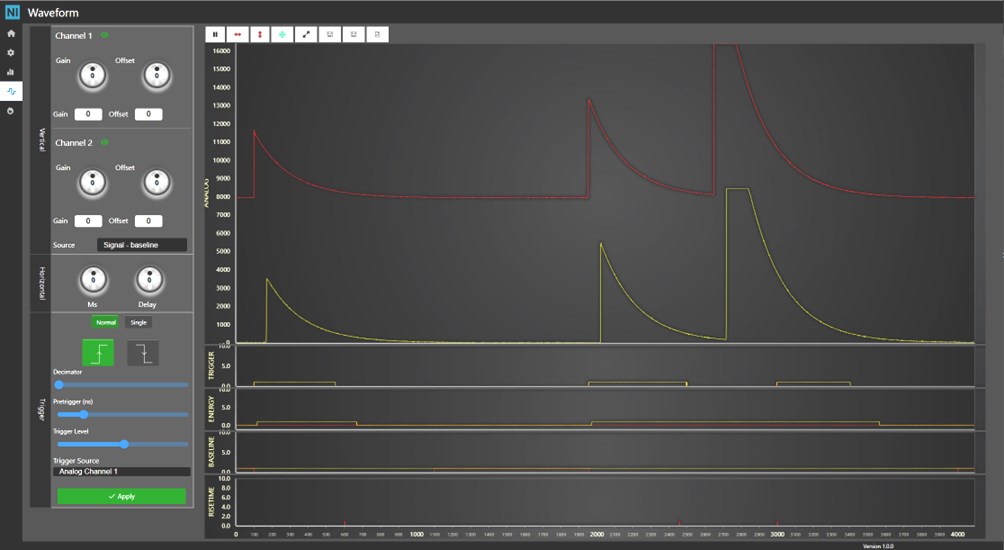
  • Waveform: analog and digital signals can be inspected and plotted for monitoring and processing parameters optimization purposes; single or multiple waveform acquisitions can be saved to file
  • Energy Histogram: the energy spectrum of valid events is built and can be automatically stored on-board or manually saved to file; peaks fitting and energy calibration can be performed in real-time
  • Time Histogram: the inter arrival time of valid events is displayed and can be automatically stored on-board or manually saved to file
  • List: Energy, baseline and Time Tag data are provided and can be automatically stored on-board in real-time
  • Statistics: during the acquisition the instantaneous and integrated counts for Trigger, ROI, Output, Pileup Reject, Saturation reject and Lost events are provided, together with Real Time, Live Time and Dead Time, while the calculated Input Count Rate (ICR) is always provided
  • MCS: during the acquisition the ICR, the OCR and the Energy Band Rate are displayed as a function of time, with a programmable Dwell Time; data can be stored on-board
  • Unattended: Jupyter Lab application, in conjunction with a dedicated python library, enables user to develop custom routines to set parameters, acquire data and store on-board waveforms, lists and spectra. Python scripting offers the possibility to perform offline advanced data analysis. File Browser application allows to browse, upload and retrieve files saved on the on-board memory through a user-friendly graphical interface.
Configurable Settings (via Web Interface)
ANALOG INPUT SETTINGS

  • Preamplifier Type/Coupling: DC for Resistive Feedback and AC for Transistor Reset (300 μs, 2 μs and 22 μs shaping constant)
  • Impedance: 1 kΩ or 50 Ω
  • Division: x0.2 (input range 2 VPP or 10 VPP)
  • Gain:
    • DC Gain: x1, x1.5, x2.5, x3, x4.5, x6, x7.5, x9, x12, x15, x18, x22, x27, x36, x45, x54;
    • AC Gain x5, x7.5, x12.5, x18, x30, x45, x60, x80;
  • Smoothing: filter applied on 21-29samples
  • Polarity: negative or positive signals
  • DC Offset: adjustable in the whole input range, expressed in percentage

ANALOG OUTPUT SETTINGS

  • Type: selection of a signal of the data processing to be provided at the analog output

DIGITAL INPUT SETTINGS

  • Impedance: 1 kΩ or 50 Ω
  • Polarity: negative or positive signals
  • Functionality: signal selected from a list of available signals to be used in data processing

DIGITAL OUTPUT SETTINGS

  • Type: signal selected from a list of available data processing signals to be provided at the digital output
  • Width and Delay: in case of Trigger signal selected, the width and the delay can be defined by the user
PROCESSING SETTINGS

  • Trigger Mode: Internal, External, Logic OR/COINCIDENCE/ANTI-COINCIDENCE of Internal and External (width and delay programmable)
  • Trigger Algorithm: Leading Edge Trigger (Threshold and Inhibit selectable) or Fast Trigger for Internal Trigger (Shaping Time, Flat Top and Threshold selectable)
  • Energy: Peak Detection in case of Leading-Edge Trigger with programmable Energy Gate and Trapezoidal Filter in case of Fast Trigger with selectable Shaping Time, Flat Top, Energy Sampling, Tau and Gain.
  • Pileup Rejector: automatic double pileup rejection with paralyzable behavior and PUR Guard Time selectable for Trapezoidal Filter, External signal or automatic simple pileup rejection for Peak Detection  
  • Baseline Restorer: moving average configurable from 21 to 214samples and Hold Time for Trapezoidal Filter and adjustable Constant value for Peak Detection
  • Saturation: automatic Saturation Rejection enable and Saturation Inhibit Time definable


ACQUISITION SETTINGS

  • Waveform: selectable analog trace to monitor, definable trigger source, trigger position, decimation factor and acquisition mode, automatic or manual saving
  • Energy Histogram: channels re-binning configurable from 1k to 32k, fitting and calibration available, logarithmic scale applicable and automatic or manual saving
  • Time Histogram: number of channels selectable from 1k to 16k and definable Time Bin Resolution, logarithmic scale applicable and automatic or manual saving
  • MCS: Dwell Time from 1 s to 3600 s with 1 s resolution

It is possible to save, load and download multiples configurations of all settings. Preset configurations stored on the device facilitates the parameters value assignment. Every time the settings are applied, the current configuration is automatically saved in order to reload the last settings value at power-on.

Communication Interfaces
USB (rear panel)

  • USB 2.0 connector, type C. Allows both for a serial communication port and virtual network connection to a PC.
    USB cable included in the kit.
10/100/1000T (rear panel)

  • Ethernet connector, type RJ45. Supports 10, 100 and 1000 Mbit/s connection to a PC or Ethernet hub.
    FTP cableincluded in the kit.
DC Power In Requirements
OPERATING SUPPLY VOLTAGE

  • +12 VDC (power jack on rear panel)
POWER CONSUMPTION (Typ. @ +12 VDC)

  • 15 W

The module can be powered by an external AC Power Adaptor included in the kit (+12 V, 3.75 A).

Environmental

OPERATIONAL CONDITIONS

  • 0 – 50°C Temperature Range – EMC compliant

Compare

Compare with Multi Channel Analyzers.

Loading...

Ordering Options

Code Description
WDT5771XAAAA DT5771 - 1 Channel Digital MCA   RoHS

Contacts

Great to have you back!